We’re excited to announce the redesign of SGD’s search landing page, making it easier than ever to find the yeast biological information you need!
What’s New?
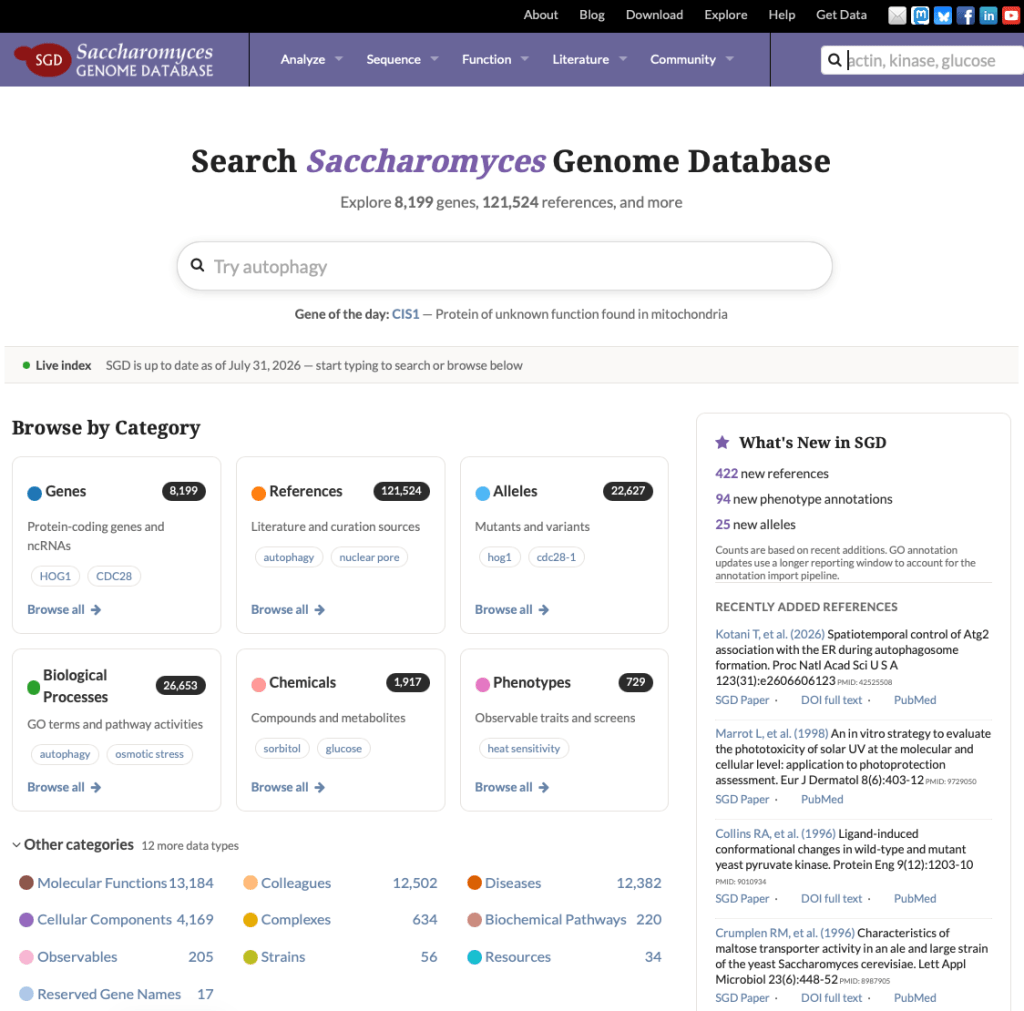
Enhanced Search Experience The new landing page features an improved search box with smart autocomplete functionality that suggests genes, chemicals, pathways, and other entities as you type. This makes searching faster and helps you discover relevant results even if you’re not sure of the exact name.
Quick Category Browsing Need to browse rather than search? The new page includes quick access buttons for popular categories including genes, complexes, pathways, and chemicals. Click any category to start exploring without typing a single character.
Advanced Filtering Refine your search results by category or other criteria to quickly zero in on exactly what you’re looking for. The redesigned interface provides clearer visual organization with distinct sections for different data types.
Stay Current with SGD The right side of the page now highlights SGD’s latest activity:
-
New Literature Added shows the most recently curated publications
-
Recent Annotations displays the latest curated data, including new phenotypes, alleles, and GO annotations
This makes it easy to stay up-to-date with the newest information added to SGD.
How to Access
There are two easy ways to reach the new search landing page:
-
Click the red “Explore SGD” button on the SGD homepage
-
Press return/enter in the search box without typing anything (empty search)
Or go directly to: https://www.yeastgenome.org/search
We Want Your Feedback
These improvements are part of our ongoing commitment to making SGD more user-friendly and accessible. We’d love to hear what you think! Contact us at sgd-helpdesk@lists.stanford.edu with your feedback or suggestions.
Happy exploring!